rackline.ai - AI Deer Scoring
- 3.2
- Rating
- 10.00K
- Installs
- Free
- Price

 Analysis by App-foxy
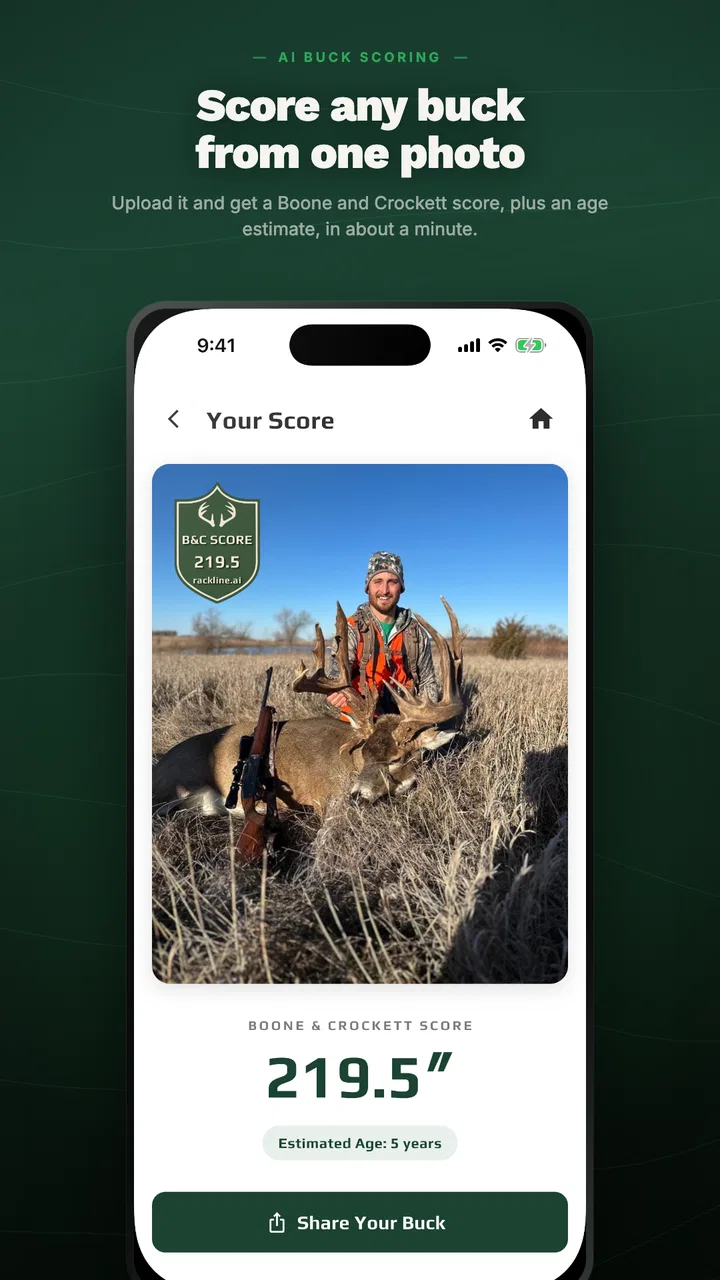
I approached rackline.ai as a practical field tool rather than a novelty camera app. Its purpose is straightforward: use photographs to estimate Boone & Crockett antler scores. That makes it relevant to hunters, wildlife observers, land managers, and anyone who wants a quick reference before seeking a more formal measurement. My first impression is that it occupies an unusual space in the Sports category. It is not a hunting game, a social feed, or a general photo editor. It is a focused scoring assistant built around a task that normally requires a tape, a trained eye, and a fair amount of patience.
The app is free to install, carries an Everyone content rating, and is made by rackline.ai. Its current store version is 3.0.28, while the app’s listed release date is October 24, 2025. Those details matter because this feels like a product that is still developing rather than a mature replacement for an official scorer. I would recommend trying it if you want a fast estimate from your phone, but I would not treat a camera-based result as the final word in a record-book decision.
How the current scoring experience fits real use
The most useful way to think about this app is as a first-pass measurement tool. Instead of laying out a rack and working through every Boone & Crockett component manually, I can start with photographs and get an immediate indication of the antler’s potential. That is especially handy when I am looking at several images after a day outdoors, reviewing trail-camera material, or deciding which rack deserves a closer inspection.
You May Also Like

 AccuWeather: Weather Radar
AccuWeather Review: A Quick, Clear Forecast for Everyday Decisions
For everyday plans, the best forecast is the one you can understand quickly. AccuWeather makes rain timing, radar, and local conditions easy to act on, with a few trade-offs.

 Hill Climb Racing
Why Hill Climb Racing Still Turns Crashes Into One More Run
A tiny car, a bumpy hill and one more upgrade: Hill Climb Racing keeps resurfacing because its simple chaos makes every near-miss feel personal.

 AliExpress - Shopping App
AliExpress Makes Global Shopping Feel Personal, but Shoppers Bear the Risk
AliExpress turns a global marketplace into a pocket-sized discovery engine. Its reach is useful, its shopping loop compelling, and its trade-offs easy to miss.

 Lords Mobile: Kingdom Wars
Lords Mobile Is a Kingdom-Building Routine, Not a Quick Match
A case-by-case verdict on the building, battles, device demands, and social commitments that make Lords Mobile rewarding for some players and exhausting for others.

 PDF Scanner app - TapScanner
TapScanner Makes Paperwork Easier to Capture, Check, and Share
TapScanner makes scanning with a phone feel less like a rescue operation and more like a dependable step in getting work done. Its capture tools are useful, though not flawless.

 Block Blast!
 Shows How Much a Puzzle Game Can Leave Out
A quiet grid game shows why puzzle players increasingly value instant clarity, repeatable skill and low-pressure play—and where the genre still needs to catch up.
More From Our News Desk
View All News


That convenience does not remove the need for good input. A photograph can hide a tine, compress depth, exaggerate a beam, or make one side appear more symmetrical than it really is. I would therefore use the result to organize my attention, not to settle an argument. If the estimate is comfortably below a personal target, it may save time. If it is close to an important threshold, I would move to a careful physical measurement or ask an experienced scorer to check it.
The app’s strongest appeal is speed. A conventional scoring session can become slow when the rack is awkward to handle, when several people want to compare it, or when the antlers are still being documented. A photo-based workflow is less disruptive. I can keep the rack where it is, capture the relevant views, and return to the result later. For someone who wants a quick answer while sorting images, that is a meaningful advantage over a tape measure alone.
There is also a useful distinction between estimating a score from photos and officially documenting a score. The first is what this app is suited to. The second demands a controlled process, consistent measurements, and confidence that the reference points have been interpreted correctly. Keeping those jobs separate prevents the most common disappointment: expecting an instant visual estimate to carry the authority of a formal measurement.
What I would photograph before trusting the result
I would begin by choosing photographs that show the entire rack clearly, with the antlers separated from distracting branches, hands, vehicle interiors, or dark backgrounds. A straight-on image may be useful for overall shape, but it can also flatten depth. Side views help reveal beam curvature and tine placement, while an opposite-side view makes it easier to notice asymmetry. The more important the decision, the less I would rely on a single dramatic angle.
Lighting is another practical concern. Harsh sunlight can wash out the edges of tines, while deep shade can merge points into the background. I would take a few calm, well-lit images instead of assuming that a close crop is automatically better. The goal is not artistic photography; it is giving the visual system enough clean information to distinguish beams, points, and gaps.
One non-obvious benefit of this approach is that it encourages me to preserve the original photographs. I can compare the image used for the estimate with the physical rack later, rather than relying on memory. That makes the app more useful as part of a documentation workflow. I would label images by side and viewing angle, keep the unedited originals, and avoid filters or aggressive contrast adjustments that might alter the apparent shape.
Where the app is more helpful than a traditional first check
A tape and a notebook remain better for a formal, repeatable score, but they are not always the best starting point. If I am reviewing a large batch of photos, the app can help me identify which racks deserve hands-on attention. If I am away from my measuring tools, it can provide a rough conversation starter. If I am teaching a newcomer how antler structure affects scoring, a visual estimate can make the discussion more concrete before we work through the measurements ourselves.
It may also help when the rack is displayed behind glass, mounted high on a wall, or temporarily difficult to handle. In those situations, a photograph may be the only convenient first step. I would still treat the output cautiously because awkward display conditions can introduce perspective problems, but the app can turn an inaccessible object into something worth examining rather than ignoring.
What the current version suggests about the product’s direction
The move to version 3.0.28 gives the app the feel of an actively evolving product. I see that as encouraging, particularly for a specialized tool whose accuracy depends on how well its image interpretation handles different rack shapes, backgrounds, and camera angles. At the same time, a version number alone does not prove that every difficult field condition has been solved. I would judge the current release by how consistently it helps with ordinary photographs, not by assuming that a newer version makes every result authoritative.
The listed average rating is 3.2 from roughly sixty-five ratings, with around sixteen written reviews. That is a mixed signal rather than a clear endorsement or rejection. To me, it suggests that the experience may vary with expectations and photo quality. Someone seeking a quick estimate may find the concept valuable, while someone expecting professional-grade scoring from any image may be disappointed. The rating makes it especially important to test the workflow with a few representative photos before relying on it for a serious decision.
Its reach is still modest, with over ten thousand installs. That is enough to show that the idea has found an audience, but it also means I would not assume the app has been tested equally across every antler style, camera, and environment. The developer, rackline.ai, is working in a narrow field where small differences in image conditions can matter. I would welcome continued refinement aimed at explaining uncertainty and helping users capture better evidence.
For existing users, the current release is best viewed as an opportunity to reassess the app with a disciplined workflow. Rather than comparing one casual photo with another, I would use the same rack, similar lighting, and multiple angles. If results shift noticeably when the viewpoint changes, that is useful information: the image setup may be limiting the estimate, or the rack may contain features that are difficult to interpret visually. Either way, the variation should make me more cautious, not more eager to choose the highest number.
How it compares with measuring by hand
Manual scoring has an obvious advantage: I can see exactly where each measurement begins and ends. I can repeat a questionable measurement, record deductions, and ask another person to verify the work. It is slower, but it is transparent. The app is the opposite trade-off. It is faster and easier to start, yet the reasoning behind an image-based estimate is less visible to me.
That difference determines which tool I would choose. For a quick shortlist, the app is more convenient. For a record-book submission, a purchase negotiation, or a close comparison between two nearly equal racks, I would prefer a physical tape, careful notes, and a knowledgeable second opinion. The app can still play a role by telling me where to focus, but it should not replace the process that produces a defensible measurement.
Compared with asking a friend to judge a photograph, the app offers a more consistent starting point, because the same image can be processed rather than interpreted differently by each viewer. However, human experience remains valuable when the rack is unusual, damaged, partially obscured, or photographed at an awkward angle. I would combine the two when the result matters: use the app for a quick estimate, then use human review to challenge the assumptions.
Compared with a general camera app, the advantage is specialization. A normal camera can capture a beautiful rack, but it does not turn that image into a Boone & Crockett-oriented estimate. The trade-off is that a general camera gives me more control over framing and documentation, so I would still use the phone’s ordinary camera habits even when the scoring workflow begins inside this app.
Costs, access, and the practical value of trying it
The app is free, which lowers the barrier to testing it with a few photographs. That is important here because image-based scoring is highly dependent on the material I provide. I would rather try the workflow on my own racks than decide from a description alone. The listing also shows in-app purchases ranging from $4.99 to $499.99 per item. Because that range is broad, I would pay close attention to the purchase screen and understand exactly what an optional item provides before spending money.
The free entry point makes sense for casual users, but the possible high-end purchase price changes how I evaluate the product. I would not pay a premium merely for a number that I cannot verify or explain. A paid option would need to save substantial time, support a workflow I genuinely use, or provide a level of detail that makes the result more useful than a manual check. For occasional curiosity, the free access is the safer place to begin.
The minimum operating-system requirement is Android 7.0, so the app is accessible on older Android devices that are still in service. That is helpful for people who keep a dedicated field phone or an older handset for outdoor use. Still, an older operating system does not guarantee an ideal camera experience. Lens quality, focus behavior, storage, and screen brightness can affect the practical workflow just as much as compatibility.
Questions I would answer before using it seriously
The first question is whether a photo alone is enough. My answer is no, not for a final score. It can be enough for a preliminary estimate if the rack is fully visible and the image is clear, but perspective and hidden details can change the interpretation. I would take several views and treat the result as a range of confidence rather than an unquestionable measurement.
The second question is whether it works for every kind of rack. I would be most comfortable with a clean, complete view of a conventional rack. I would be more careful with broken points, unusual growth, heavy shadows, velvet, overlapping antlers, or any situation where the camera cannot separate one feature from another. Those cases are precisely where a knowledgeable human scorer becomes more valuable than an instant estimate.
The third question is whether I need internet access or a newer phone. The app’s store facts establish its Android compatibility, but they do not give me a reason to assume identical performance on every device or under every connection condition. I would test it at home before heading into the field, confirm that the camera workflow is comfortable, and avoid making the first serious attempt when the result is time-sensitive.
The fourth question is how to handle a surprising result. I would not immediately retake the same photo until I obtained the number I wanted. Instead, I would inspect whether the rack is fully visible, whether the angle is distorting one side, and whether the background hides any points. Then I would capture a deliberately different view. Agreement across sensible angles is more persuasive than a single unusually high estimate.
The fifth question is who should skip it. I would skip it if I need an official score, if I dislike photographing and organizing racks, or if I already own the measuring tools and have a reliable scoring routine. I would also avoid treating it as a substitute for field judgment. Its value is greatest for people who want a fast, accessible first look, not for users who need a legally or competitively decisive measurement.
What I would like to see next
The most important area to watch is transparency. A useful scoring assistant should help me understand which parts of the image it recognized confidently and which parts may be uncertain. Even a simple indication that a view is incomplete, poorly angled, or difficult to interpret would improve trust. I would rather receive a cautious result with a clear warning than a precise-looking number that encourages false confidence.
I would also watch how the app handles repeatability. If I photograph the same rack from sensible angles, the estimates should be close enough to support a practical decision. Large swings would not necessarily make the tool useless, but they would show that the workflow needs better guidance. Clear capture instructions, side-by-side image review, and a way to revisit the original photographs would all make the tool more dependable without pretending that photography replaces measurement.
Another worthwhile direction would be better support for the handoff from quick estimate to manual verification. The app does not need to become a full record-book notebook to be useful. It could simply help users preserve the images, note which rack was reviewed, and identify the measurements that deserve a second look. That would turn a one-time estimate into a more responsible documentation process.
My overall view is positive but deliberately measured. This is a convenient screening tool, not a substitute for an official scoring session. I like the idea of using a phone to narrow down which racks deserve closer attention, and the free starting point makes experimentation easy. The mixed user rating and relatively small install base tell me to test it personally rather than assume universal reliability, while the optional purchase range means I would be careful before upgrading.
I would recommend rackline.ai to a hunter or enthusiast who wants a quick photo-based estimate and understands its limits. I would use it after photographing a rack carefully, compare more than one angle, and verify any result that affects a serious decision. If that is the workflow you want, the app offers a useful shortcut. If you need a transparent, repeatable, officially defensible score, I would choose manual measurement or an experienced scorer instead. In my experience, that honest division of labor is where this specialized Sports app makes the most sense.
FAQs for rackline.ai - AI Deer Scoring
01What is rackline.ai – AI Deer Scoring used for?
rackline.ai is designed to help hunters and wildlife enthusiasts estimate a deer’s antler score from a photograph. The app uses AI-based image analysis to identify antler characteristics and provide an approximate score, making it useful for quick field evaluations, record keeping, and comparing potential trophy animals. It should be treated as an estimation tool rather than an official scoring service.
02How do I get the most accurate result from a deer photo?
For the best results, take a clear, well-lit photo showing the entire rack from a relatively straight angle. Avoid heavy shadows, motion blur, branches covering the antlers, or extreme side views. The deer’s head and antlers should be visible at a useful scale, and uploading a higher-quality image generally gives the AI more information to analyze. Several angles may provide a more reliable overall assessment.
03Is the score provided by rackline.ai an official Boone and Crockett or Pope and Young score?
No. The result generated by rackline.ai should be considered an AI-assisted estimate, not an official measurement or certified record-book score. Formal scoring may require precise measurements, specific scoring rules, drying periods, and an approved scorer. Differences can occur because of image perspective, hidden antler details, lighting, and the app’s interpretation of the rack, so use the result as a convenient reference rather than definitive proof.
04Does rackline.ai work with every deer species and antler type?
The app is primarily intended for analyzing deer antlers, but performance may vary depending on the species, rack shape, image quality, and available visual information. Typical whitetail-style racks may be easier for the system to interpret than unusual, damaged, velvet-covered, or partially obscured antlers. Before relying on a result, check the app’s current description and supported regions, since compatibility and AI capabilities can change through updates.
05Does rackline.ai require an internet connection, and is my photo data private?
AI image analysis may require an internet connection if photographs are processed on the app’s servers rather than entirely on the device. Before uploading personal or hunting images, review the app’s privacy policy, permissions, and terms to understand how photos are stored, processed, or deleted. Availability of offline features, account requirements, subscriptions, and limits on free analyses can also depend on the current version and your platform.
Pros
- Fast AI-assisted scoring for deer photos
- Useful reference for hunters learning antler evaluation
- Can help organize and compare scoring results
- Simple concept focused on one specific hunting task
- May reduce manual measuring and calculation errors
Cons
- AI results may be unreliable with blurry or poorly framed photos
- Scoring can vary from official club or hunting standards
- Requires suitable images and enough antler detail for analysis
- Privacy policies should be checked before uploading hunting photos
- Limited usefulness for species or antler types outside its focus

rackline.ai - AI Deer Scoring
Gallery